 PixDrive
Anyone who controls digital LED strips over a network runs into two names sooner or later: Art-Net and sACN. Both carry the same lighting data over ordinary Ethernet networks, and both are supported by software, controllers and consoles across the industry. And both keep raising the same question during setup: which one do I pick?
The short answer: for small to medium setups either one usually works, and Art-Net is a touch easier to set up. As soon as you deal with many universes, many pixels or several controllers on the same network, sACN plays to its strengths. The long answer is in this post, including the calculation that matters most in the end: how many pixels you fit into one universe, and how big your network becomes as a result.
PixDrive has both protocols built in. So you don’t have to commit to one technology when you buy the software, only to find it no longer fits later. It’s still worth understanding what’s behind the two names.
The shared foundation: DMX512
Art-Net and sACN aren’t competitors to DMX, they’re its extension. DMX512 is the old stage-lighting standard that has driven fixtures, dimmers and moving heads since the 1980s. One DMX cable carries exactly one universe, and a universe consists of 512 channels. Each channel holds a value from 0 to 255.
For LED strips this split is exactly what counts. A single RGB pixel needs three channels, one each for red, green and blue. A universe with 512 channels therefore covers 170 RGB pixels (170 × 3 = 510 channels, two go unused). With RGBW pixels using four channels it comes to 128 pixels per universe. Keep this number in mind, because it decides how many universes your installation needs.
The catch: a DMX cable only carries one universe. Anyone trying to drive 20 metres of pixel strip with a few thousand LEDs would end up with an unwieldy tangle of cables using classic DMX. This is where Art-Net and sACN come in. Both pack DMX data into network packets and send many universes at once over a single Ethernet cable. That’s the whole trick: DMX over the network, just at a much larger scale.
What is Art-Net?
Art-Net was developed in 1998 by the British company Artistic Licence. It’s the older of the two protocols and has become the de facto standard over the years. Practically every device and every piece of software with networked lighting control speaks Art-Net.
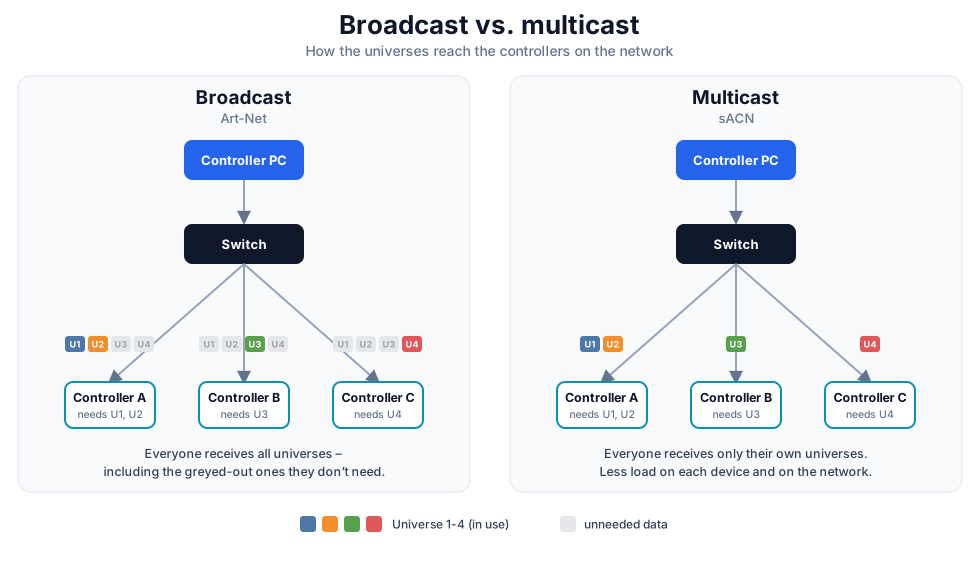
Technically, Art-Net sends its data over UDP on port 6454. The current version, Art-Net 4, allows up to 32,768 universes, which is more than enough for the vast majority of LED projects. Originally Art-Net sent its packets by broadcast, meaning to all devices on the network at once. That’s convenient, because you barely have to deal with addressing, but it loads the network, because every device receives every packet, including the universes it doesn’t need. Newer versions therefore use unicast, where each packet goes specifically to the device meant to process it.
A practical advantage of Art-Net is automatic device discovery. Through so-called ArtPoll packets, controllers announce themselves on the network, so the control software finds them without you entering every IP address by hand. That’s pleasant for getting started: connect the network, devices show up, off you go.
What is sACN?
sACN stands for Streaming ACN and is known under the standard designation ANSI E1.31. Behind the standard is ESTA, a trade association for the entertainment technology industry. sACN is younger than Art-Net and was designed from the start with large networks in mind.
The data runs over UDP on port 5568, and sACN supports up to 63,999 universes. The most important difference, though, is in how the packets are sent: sACN uses multicast by default. Each universe gets its own multicast address from the range 239.255.0.0 upward. Devices on the network subscribe to exactly the universes they need, and the switch sends them only those. A controller that handles universes 1 to 4 never even sees the data for universe 200. That keeps the load on each individual device low, even when hundreds of universes are moving across the network.
For this to work, though, your network has to play along. Managed switches should support IGMP snooping so they forward multicast packets selectively rather than to everyone. On a cheap unmanaged switch, multicast can otherwise degrade into broadcast, and the advantage is gone. If needed, sACN can also run over unicast, in which case it behaves much like Art-Net in unicast mode.
There are two more things sACN can do that Art-Net doesn’t offer this way. First, a priority per packet, adjustable from 0 to 200, with 100 as the default. This lets two control sources send the same universe, and receivers automatically follow the one with the higher priority. That’s the basis for backup systems: if the main console fails, a second one with lower priority takes over seamlessly. Second, built-in synchronisation through dedicated sync packets, so that many universes adopt their new state at exactly the same moment instead of visibly switching one after another.
The differences at a glance
| Feature | Art-Net | sACN (E1.31) |
|---|---|---|
| Developer | Artistic Licence (1998) | ESTA, ANSI E1.31 |
| UDP port | 6454 | 5568 |
| Universes | up to 32,768 (Art-Net 4) | up to 63,999 |
| Channels per universe | 512 | 512 |
| LEDs per universe | 170 RGB / 128 RGBW | 170 RGB / 128 RGBW |
| Max. LEDs (theoretical) | ~5.6 M RGB / 4.2 M RGBW | ~10.9 M RGB / 8.2 M RGBW |
| Transmission | broadcast / unicast | multicast / unicast |
| Device discovery | automatic (ArtPoll) | manual / by configuration |
| Priority per packet | no | yes (0–200) |
| Backup with multiple senders | awkward | built in via priority |
| Network requirement | low | IGMP snooping recommended |
The table shows the pattern: Art-Net is built for simplicity, sACN for scale and reliability. Neither protocol is fundamentally better, they’re built for different situations.
What this means for LED strips in practice
With stage fixtures we’re talking about a handful of universes. With pixel LEDs the maths looks different, and that’s why the choice of protocol matters more here than elsewhere.
Take a mid-sized project: a media facade or a stage set with 10,000 RGB pixels. At 170 pixels per universe that’s about 59 universes. If you want to animate that surface at 40 frames per second, your software sends 59 universes onto the network 40 times per second. Over Art-Net broadcast, every device on the network would receive the full data stream, including the controller responsible for just three universes. Over sACN multicast, each controller receives only its own universes. On large installations that’s the difference between a stable image and stutters, because a device gets flooded with data it doesn’t need.
For a small setup, on the other hand, say a ceiling with a few hundred LEDs and a single controller, this difference is barely noticeable. There you transmit a handful of universes, and Art-Net over unicast runs just as cleanly as sACN, but is quicker to set up.
There’s one more practical point that often gets overlooked: addressing. sACN doesn’t care what IP address a controller has, because it addresses by universe. If your devices get their IP via DHCP and it changes now and then, there’s nothing to maintain with sACN. With Art-Net in unicast mode, by contrast, the software points at specific IP addresses, which should then stay stable. In practice you tend to give controllers fixed IPs regardless of which protocol you run.
Which protocol should you choose?
As a rough guide: start with Art-Net if your setup is manageable, you don’t want to run much networking gear and automatic device discovery saves you work. For home projects, smaller installations and quick tests, Art-Net is the pragmatic choice.
Reach for sACN when your installation grows, when many universes and several controllers run on the same network, or when you need reliability through a backup system. Priority per universe and targeted multicast routing are made for exactly these cases. The prerequisite is a network with managed switches that support IGMP snooping.
And if you really want to know: test both. Both protocols run over the same network, often even at the same time. You can bring the same setup online with Art-Net first and switch to sACN later without touching the wiring. That’s exactly why it doesn’t pay to commit early.
Practice: what matters on the network
Whichever protocol you choose, a few things decide whether your LEDs run cleanly or twitch. The most common mistake is a network that’s too weak. Pixel data is a constant stream: at 40 frames per second and many universes, a lot of traffic runs over the line without pause. A basic consumer router or an overloaded Wi-Fi hits its limits fast. For anything beyond a small setup, LED control and normal office or internet traffic belong on separate networks, or at least on their own decent switch. Wi-Fi is generally a bad idea for the actual pixel transmission, because it’s too unreliable and too slow for constant high data rates.
The second point is fixed IP addresses. Even though sACN addresses by universe and Art-Net finds devices on its own, you spare yourself a lot of trouble if your controllers have fixed IPs instead of changing DHCP addresses. Assign the addresses in a dedicated range that you document, and you’ll immediately find the right device when there’s a problem.
Third, the frame rate. More isn’t automatically better. 30 to 40 frames per second are enough for smooth animations; going to very high rates without need only creates more network load without the eye seeing a difference. If your image stutters, the cause is more often an overloaded network than a frame rate that’s too low.
And if you run sACN with multicast: actually check whether your switches have IGMP snooping enabled. On many managed switches the feature is present but switched off out of the box. Without it, the switch treats multicast like broadcast and sends every universe to every port. Then you’ve done the work and still have the downsides of broadcast.
Frequently asked questions
Can I run Art-Net and sACN at the same time on the same network? Yes. The two protocols use different ports and don’t interfere with each other. In practice they often run in parallel, for instance when older devices only speak Art-Net and newer ones are set to sACN.
Do I lose image quality when I switch protocols? No. Both transmit the same DMX values at 8 bits per channel. A pixel ends up with exactly the same colour values regardless of which protocol carried the data. The difference lies solely in how efficiently the data moves through the network.
How many pixels can I control in total? In practice this is limited less by the protocol than by your network and your controllers. On paper, the universes of both protocols cover hundreds of thousands of pixels. The real limit is how much data your switch and your controllers can process reliably.
Do I need expensive networking gear? Not for small projects. A basic switch and Art-Net are enough. Only when many universes and several controllers come together do a managed switch with IGMP snooping and a cleanly separated network pay off.
Both protocols in PixDrive
PixDrive controls digital LED strips over both Art-Net and sACN. You decide per project which protocol fits and switch it in the software without rebuilding your setup. Start small and grow into a larger installation later, and PixDrive grows with you: the same setup you test over Art-Net today, you run over sACN tomorrow with several controllers and universes.
That takes the edge off the question from the beginning. You don’t have to guess which protocol will fit your project in two years, and you don’t tie yourself to software that can only do one of the two. You set up your LEDs, pick the protocol that makes sense right now, and change it when your project changes.
If you’re standing in front of your first installation, the simplest path is: connect the strip, start with Art-Net in PixDrive and see whether the image holds. Once the project grows, you now know what to watch for with sACN, and the switch is a matter of minutes. Guides for exports, the script engine and external control are in the documentation.