Skip to content
PixDrive

Modes

How PixDrive drives the LED-Player-S3

No computer

TPM2 file from the SD card

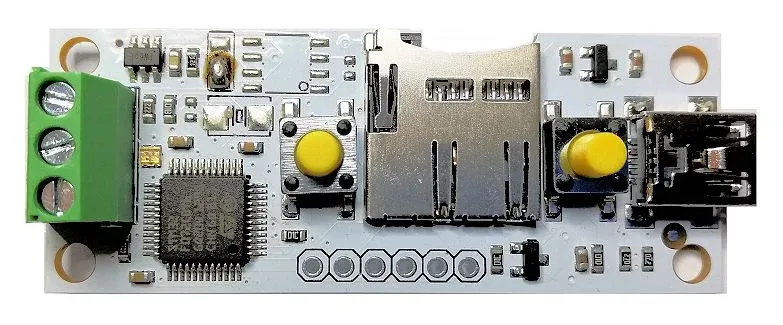
You export the show from the sequencer as a TPM2 file and the LED-Player-S3 plays it from the microSD card – no computer, no network. The file holds no frame rate: you set it on the player, and it has to match the export.

  1. 1Export the sequence from the sequencer in the TPM2 Serial (.tpm2) format and note the frame rate
  2. 2Copy the file to the microSD card, with the extension and folder described in the player’s manual
  3. 3Enter the LED count and the same frame rate in the player’s configuration

Specifications

At a glance

Manufacturer
DIAMEX
Article number
150208
Processor
32-bit Cortex-M
Playback
TPM2 files from microSD (SDHC up to 32 GB, FAT32)
LEDs
up to 512
LED chips
WS2812, PL9823, APA106, SK6812 (RGBW)
Controls
2 buttons, built-in test mode
Connectors
USB, LED output
Dimensions
board 55 × 22 mm

DIAMEX and LED-Player belong to their respective owners. Details from the DIAMEX shop as of November 2026; the manufacturer’s manual is authoritative.

Get started

Test PixDrive with the LED-Player-S3

The demo runs with no time limit and no credit card – on Mac and Windows. One device and one universe are enough to try it.

macOS 12+ · Windows 10 / 11 · No credit card required