 PixDrive
Play without a computer
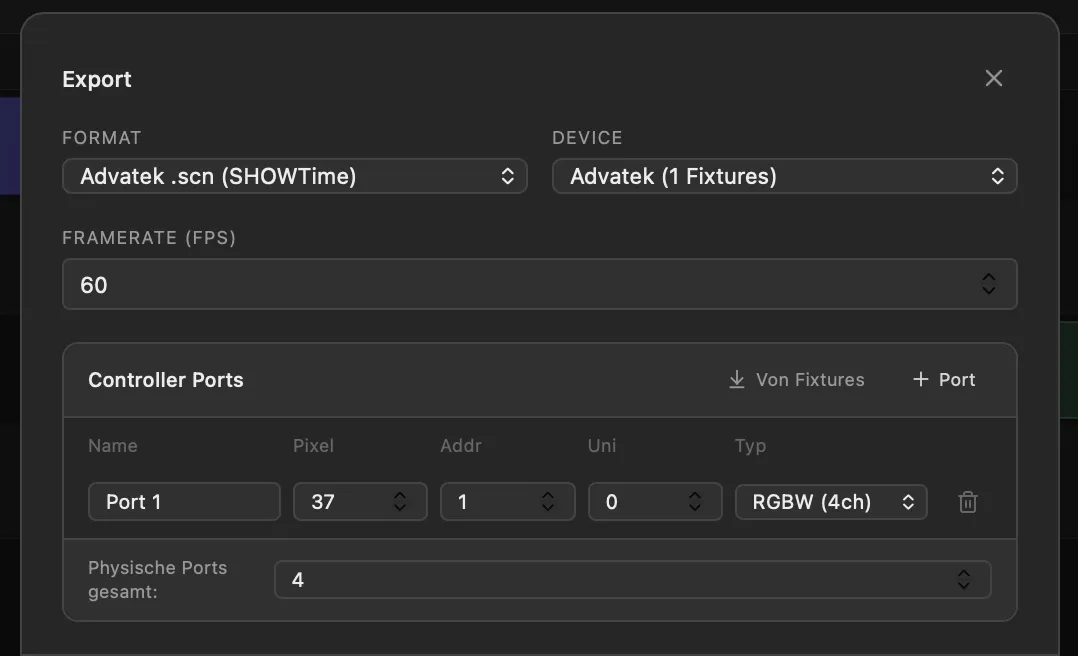
PixDrive exports sequences as SHOWTime scenes. An Advatek PixLite Mk3 plays them from its microSD card, optionally triggered right at power-up.
Use case
Plan light shows for facades, media walls and permanent installations on your computer, then let them run straight from the controller – no PC required.
Free demo · No registration · Mac & Windows
Typical projects
The situation
With facades and architectural lighting the show is not over after two hours. It runs every evening, often for years – and nobody wants to keep a PC in the plant room for it that pulls updates and fails at some point.
With PixDrive you program the content at your desk against a model of the facade. Then you export it as a SHOWTime scene to an Advatek PixLite Mk3. The controller plays the show from its own microSD card; you only need the computer again when new content comes along.
Features
PixDrive exports sequences as SHOWTime scenes. An Advatek PixLite Mk3 plays them from its microSD card, optionally triggered right at power-up.
The full version drives any number of devices and universes over Art-Net and sACN – no extra charge per universe.
When a sequence is set to loop with a crossfade, PixDrive renders the export so the end flows into the start without a visible jump.
When PixDrive runs live, Home Assistant, Node-RED or your own script start shows via the REST API and set the brightness, for example dimmed at night.
Real-world example
16 RGBW linear luminaires with 128 pixels each hang on an Advatek PixLite E16-S, one luminaire per port. 128 RGBW pixels use exactly 512 channels – every port fills its universe completely, nothing is wasted.
With 150 instead of 128 pixels per luminaire it would be 32 universes – twice as many for 17 % more pixels. That is why the pixel count per port is worth checking at the planning stage.
Open in the DMX calculatorFrom practice
Compare every row of the port table with the PixLite’s web interface. If a port is off, colours land on the wrong pixels or stay dark.
The export renders the complete sequence frame by frame. Effects that only run live and are not on the timeline are not in the file.
More frames per second give smoother motion but larger files. For slow colour fades on a facade, 30 fps is often enough.
PixDrive remembers the port table per device. New content for the same facade exports without setting it up again.
More use cases
Program pixel shows on your laptop, play them live over Art-Net or sACN and trigger them from the lighting console.
Light-up house, shop window or trade fair booth: build the show and play it standalone from an SD card.
Drive ESP32 and WLED over Art-Net or sACN, write your own effects in Lua and play shows from an SD card.
Get started
The demo runs with no time limit and no registration. Test live effects, LED layout and the script engine with one device and one universe.
macOS 12+ · Windows 10 / 11 · No account required